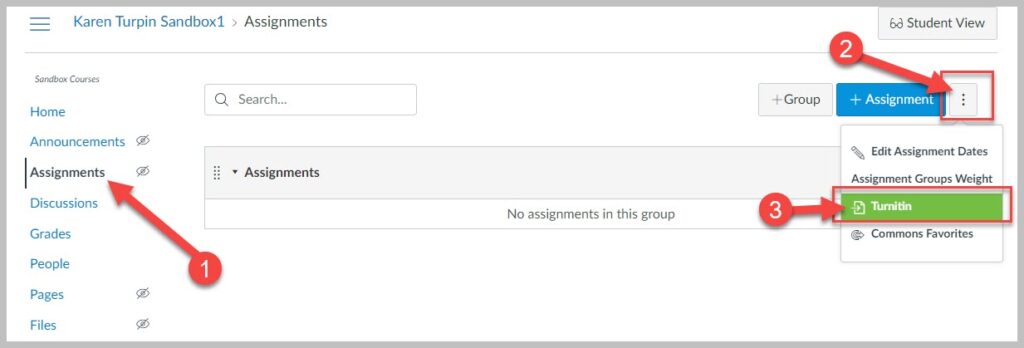

Turnitin Canvas Plagiarism Framework

Turnitin Plagiarism Framework is available within Canvas and offers a tighter integration between a Canvas assignment and Turnitin than the Turnitin 1.3 LTI Canvas integration. No separate login or password is required for faculty or students.

The primary difference between the two tools is that the Turnitin LTI 1.3 integration is best used if faculty prefer to use Turnitin for grading and feedback; the Turnitin Plagiarism Framework is preferred by faculty who want Turnitin for plagiarism prevention but like to use the Canvas grading and feedback tools.

MiraCosta College has an unlimited license to Turnitin, GradeMark, and Peer Review.

Turnitin Canvas Plagiarism Framework Guides

Turnitin Integration Canvas Resources


Testing a Turnitin Assignment with your MCC Sample Student

Turnitin is an LTI tool that is globally installed on our Canvas system. LTI tools are not native to Canvas so they will not work in the internal Canvas Student View. You must log off of Canvas, as an instructor, then log on with your MCC Sample Student account. Now you will be able to experience a Turnitin assignment within your Canvas course as a student.
Additional information

LabArchives Electronic Lab Notebook

LabArchives

LabArchives is an electronic lab notebook that can help instructors and learners better manage, share, and publish research notes, data, protocols, and related documents.

MiraCosta College’s  institutional license gives all  MiraCosta College students, staff, and faculty free access to LabArchives. Log on with your MCC login and password to access LabArchives. Faculty can also integrate Lab Archives with Canvas.

Features of LabArchives

  • Share and collaborate on notebooks by multiple parties.
  • Store multiple file types, including images, GraphPad Prism, FlowJo, PDFs, and Office documents
  • Create templates, forms, and custom applications for routine laboratory tasks.
  • Instructors can provide feedback on students’ notebooks.
  • Storage of every version of every file, recording the date, time, and username.

Faculty LabArchives Help and FAQs

Need Help?

LabArchives Information for your Students

The MiraCosta College ITS Help Desk can assist your students with Canvas and LabArchives.

Adjust-All

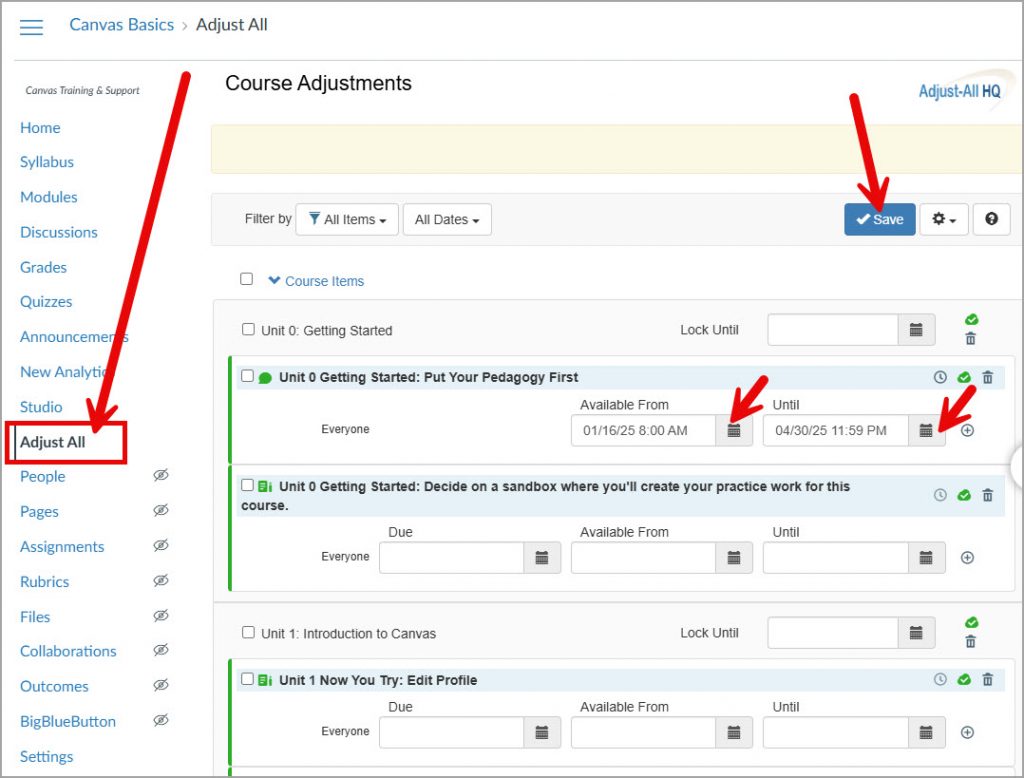
Adjust-All is a simple Canvas tool that enables you to change all course item due dates and announcement publication dates in one place, rather than having to access each item individually.

View a short (3½ minutes) video that will show you how it works!

Adjust-All Tips

  • The first time you use Adjust-All, you’ll need to click the blue Authorize button – it’s fine 😊
  • This tool is only available to faculty – students won’t see it in your course menu.
  • There are a few other things you can do with Adjust-All. Click the gear icon at top right to see options for bulk adjustments to dates or publishing status.
  • See the Adjust-All user guide for more tutorials and guides to using Adjust-All.

Adjust-All Limitations

  • Doesn’t work to update publish or to-do dates for Pages
  • Doesn’t work with New Quizzes
  • An assignment that is included in multiple modules may need to be updated multiple times within Adjust-All

MCC Canvas

You’ll find “Adjust All” toward the bottom of each Canvas course’s navigation menu. Adjust the dates of your course items, and click Save.

Adjust All in Canvas
1 … 3 4 5 6 7 … 21