
Online Ed Tips: End of Spring 2024

Dear MiraCosta Faculty, 

Congrats on (just about) making it to summer. Here are reminders and opportunities as you wrap up spring and start thinking about what’s next.

Canvas End of Term

After June 6, your spring Canvas classes go into read-only mode for you and your students. If you wish to remove access to any of your course materials for your current students beyond this semester, you need to do so by then. Review our Canvas end-of-term guide for details. It also discusses what you need to do if you have any students who will receive Incomplete grades.

Support for Wrapping Up Classes and Summer/Fall Class Prep 

Summer Professional Learning Opportunities

  • The Online Teaching Conference is in Long Beach, June 26-28. Early bird registration ends May 24. Contact me if you’re interested in funding to support your registration.  
  • There are some great @ONE online teaching self-paced courses. (Unfortunately, the facilitated summer courses seem to be full.) 
  • A free online conference called Cal OER returns for its fourth year, Aug. 7-8. The call for proposals closes June 3. Conference registration ($25) is open now.
  • When’s the last time you explored the TIC website? Start on the tic.miracosta.edu home page and see where it leads you – there are many great resources including workshop recordings, tutorials, examples, and guidelines for online teaching.

Have a super summer!

– Jim

Jim Julius, Ed.D.
Faculty Coordinator, Online Education
Online Ed News You Can Use – Spring 24

Happy almost May! Some quick tidbits and opportunities related to all things online …

Summer and Fall Classes are in SURF and Canvas

Professional Learning Opportunities related to online teaching

Jim Julius, Ed.D.
Faculty Coordinator, Online Education
Department Courses in Canvas

Department courses are manually created courses within Canvas that can be used for communication and collaboration with MiraCostans. Some examples of department courses are special collaboration workgroups, academic senate committees, instructional departments, and student clubs. For further information contact Karen Turpin at [email protected]

Adding Users to Department Courses

Instructors of department Canvas courses can add any MiraCosta College user to the course with Student, Teacher, TA, or Designer permissions. Department courses are not tied to the SURF registration system.

Directions

  1. Enter your Canvas course
  2. Click People on the left course menu
  3. Click the +People button at far right
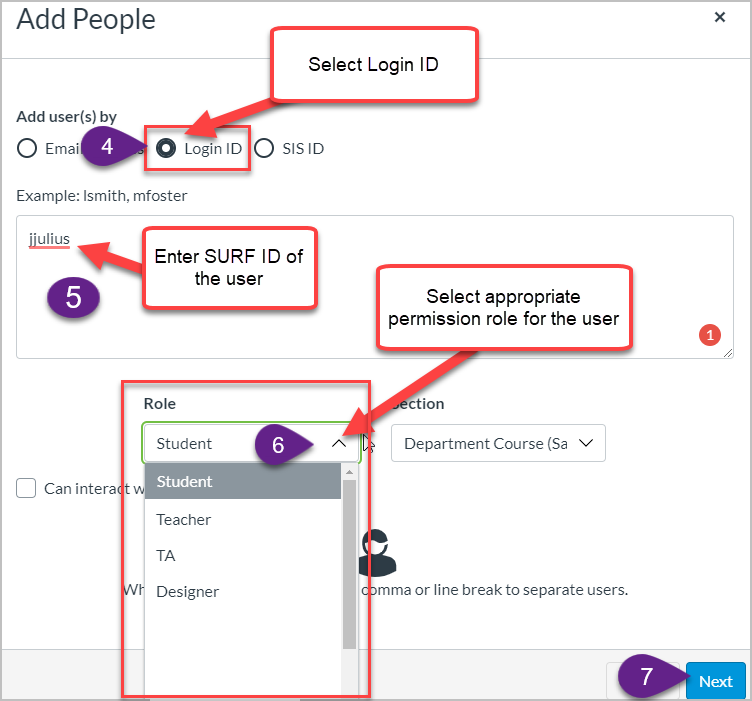
  4. Select Login ID
  5. Enter SURF ID of the user in the box.
    • You can enter one user at a time.  Example: jjulius
    • Or multiples with a comma and space between each. Example: jjulius, sdavis
  6. Select the appropriate role for the user. ‍
    • Available role options are Student, Teacher, TA, Teacher, Designer, and Student (see below for details on these options)
  7. Click the Next button
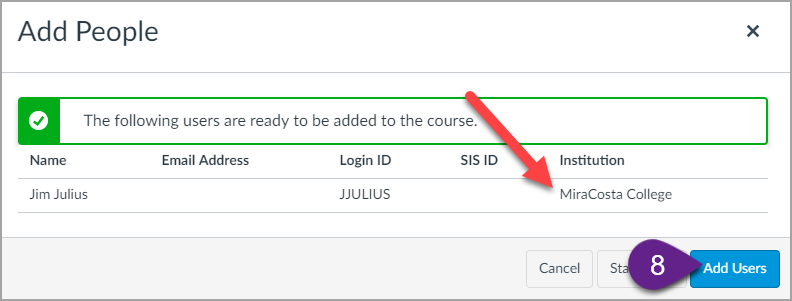
    • Some IDs may already be used in Canvas at other colleges. If you get a prompt about this, select the ID that is associated with MiraCosta College.
  8. Click the Add Users button
Step 4, 5, and 6

Course Roles Explained for Department Courses

Student Role

  • Primary use: Students enrolled in a course site.
  • Permissions: The Student role has permissions to view course content and engage in course activities, including the ability to submit assignments, participate in discussions, and view the course roster.
  • Limitations: Students cannot manipulate settings for a course.

Teacher

  • Primary use: The instructor assigned to teach a class.
  • Permissions: Teachers have all course-level permissions, including the ability to add, edit and delete all
  • content in a course, edit course settings, and manually add individuals with active Canvas user accounts.
  • Limitations: None.

Teaching Assistant (TA) Role

  • Primary use: TAs assigned to a specific class to help the instructor.
  • Permissions: TAs have permissions equivalent to the Teacher role. They have all course-level permissions, including the ability to add, edit and delete all content in a course; grade students; edit course settings, and manually add individuals with active Canvas user accounts.
  • Limitations: None.
1 … 14 15 16 17 18 … 59