
Canvas Basics: Getting Started with Confidence ( Zoom Recording, 55 minutes) – 1/13/2025 workshop by Nadia Khan and Karen Turpin – Additional Resources: Canvas Basics Resource Page
Spring 2025 online teaching resources & reminders
Dear colleagues, I hope your break was restorative and you’re feeling as ready as possible for 2025! Please see below for reminders of local resources to help you enable your students to succeed in online environments this spring.
Expectations and Recommendations for Faculty Teaching Online
- The MiraCosta Online Class Quality Guidelines document provides MiraCosta requirements and recommended practices for online instructors. Join our accompanying Canvas course to be inspired by (or even copy from) real Canvas examples shared by colleagues.
- Class Availability in Canvas – Faculty teaching distance education (online, HyFlex, and hybrid) classes are expected to make their classes available by mid-day on the Monday of the week in which they begin. To learn more, please see MiraCosta Distance Education Class Authentication Compliance, Start-of-Term Availability Procedures, and Recommendations.
- Accessibility – Please be sure to use the PopeTech accessibility checker on your Canvas classes, and use the auto-captioning and caption cleanup tools for videos created via Canvas Studio, Zoom, or YouTube.
- Zero- and Low-Textbook Cost Course Sections – If you are teaching one of these, please be sure to mark your class in SURF as LTC or ZTC if you haven’t already, so students know that your class has lowered that access barrier!
- Artificial Intelligence class policy – Students want to know the “rules” around using AI in your class. There is not a one-size-fits-all answer to this question so there is not a blanket college policy. Please check out a 1-page guide to help you craft language to share with your students if you’re still working on that! Learn more about AI tools and guidance for MiraCosta faculty and students.
Support for You
- Our Canvas start-of-term checklist can help you prepare your classes. New to Canvas? We have lots of resources to help you get started, as well as workshops this week!
- The TIC website is a great starting point for all kinds of information and support for teaching with online technologies – see the last section of this email for specific TIC links to MiraCosta technologies supporting online teaching and learning.
- Ongoing faculty support – You can set a meeting with Instructional Designer Nadia Khan, for help with Canvas and teaching with tech. We have a new instructional designer also available for 1-1 support, Stephanie Kelley, especially for faculty working on use of OER/ZTC course materials.
- Tech Support – Canvas options include 24×7 phone and chat support. Just click the Tech Support button at lower left in Canvas! Zoom and other MiraCostatech support for faculty is available through the MiraCosta employee help desk.
Support for Your Students – Please help your students to be aware of and make use of these important services and resources!
- Student Online Academic Readiness workshops – In collaboration with the library, I’ll be offering a number of these across the first nine weeks of the term – see all dates and times on the MiraCosta Online site and in Canvas announcements. These workshops engage students with resources MiraCosta provides to support them, as well as habits and attitudes of successful online students. Encourage your students to attend and, if you like, find out which of your students participated in order to incentivize their attendance. Faculty are welcome to attend as well!
- Technology Needs – Be sure to share the form for students to fill out if they need a laptop and/or wifi hotspot to succeed this semester.
- Tech Support – At lower left in Canvas is a button for students to quickly access Tech Support options, including 24×7 phone and chat support from Canvas, and our local MiraCosta student help desk.
- Online Student Support Access Points – the Student Support Hub in Canvas, accessed via the Student Support button on the left in Canvas, gives quick access to online support from the library, Learning Centers, counseling, career center, open computer lab staff, student help desk, health services, CARE team, and more! The Ask the Spartan chat integrated into MiraCosta’s website provides both automated responses and the opportunity to connect to Live Chat with staff from many student support areas. The Help Hut and Online Education webpages are also great starting points for students to connect with all kinds of support services when they’re not in Canvas.
MiraCosta’s Online Education Tools
Select the links for a detailed MiraCosta-specific overview (and often, recorded Flex workshops) for each tool below. Please don’t hesitate to contact me if you have questions about these or other resources.
- Canvas – we all use Canvas, right?
- Zoom – if you’re using Zoom, make sure you’re using a pro Zoom account through MiraCosta.
- Canvas Studio – enables faculty and students to create videos while inside Canvas. Faculty can create interactive discussion or quiz activities based on video. Auto-captioning and caption clean up tools are high-quality and easy to use, but not automatic!
- Pronto is an incredible mobile-friendly and Canvas-integrated messaging platform that’s ready to use in every course.
- Pope Tech helps faculty detect and correct accessibility issues within Canvas. The PopeTech dashboard tool (via the Pope Tech Accessibility course menu item) provides a course-level guide for addressing all accessibility issues in a course in one place.
- SensusAccess provides multi-format course material accessibility and file type conversion options for students. If you notice an S symbol next to your page title and next to items in the Modules view, that’s SensusAccess.
- Perusall is a social annotation tool available within Canvas that makes it easy for students to comment/discuss right on a text, document, or image.
- Lab Archives Electronic Notebook is an online notebook especially useful for translating lab manuals and student notes/work into the online environment.
- PlayPosit – This video interaction tool offers more complexity and options than Studio. Studio is a great place to start, but if you’re looking for more types of interactivity to add to your videos, PlayPosit is great.
- Turnitin – help students learn to properly cite sources and avoid plagiarism. Also provides grading and peer review tools for written work. Turnitin has included an AI detection capability for instructors, but please beware of false positives should you use it. Most experts agree that AI detection tools are extremely unreliable.
Professional Learning for Online Teaching – Spring Possibilities
- In addition to many online ed workshops this Flex week, you can review lots of wonderful recorded MiraCosta online teaching workshops anytime (Flex-eligible, of course)!
- Friday, Jan. 31: MiraCosta is holding a college-wide day for discussing and learning about AI. Please RSVP and consider proposing a faculty-focused session.
- First and third Thursdays, 12:30 pm on Zoom and in OC T250: Jim Sullivan, Nadia Khan, and I offer regular discussions on teaching with technology. Look for announcements from Jim S, MiraCosta’s Joyful Teacher (aka Capybara guy).
- March 10-14: San Diego area community colleges are offering a joint online AccessAbility Week with online workshops throughout that week.
- June 16-18: The CCC Online Teaching Conference returns to Long Beach. Consider submitting a proposal (due Jan. 31)! MiraCosta faculty who are presenting can get all travel expenses covered from the Online Ed budget!
- @ONE online teaching courses are open to all California Community College faculty. Some are self-paced and available anytime. Facilitated spring courses are open for enrollment now, and are completely free. They’ll fill, so sign up now if you’re interested!
Best wishes for a great spring!
– Jim
Jim Julius, Ed.D.
Faculty Coordinator, Online Education
MiraCosta Online News – End of 2024!
Dear MiraCosta Faculty,
Here are a few reminders, resources, and opportunities as 2024 comes to a close!
Canvas End of Term Support and Reminders
After Dec. 31, your fall Canvas classes go into read-only mode for you and your students, and move from the Canvas Dashboard to the Past Enrollments area of Canvas (select Courses at left in Canvas, then All Courses to see Past Enrollment courses). If you wish to remove access to any of your course materials for your current students beyond this semester, you need to do so by Dec. 31. Review our Canvas end-of-term guide for details. It also discusses what you need to do if you have any students who will receive Incomplete grades, as well as what to do if you wish to close course access sooner than Dec. 31. If you’d like help with any semester wrap-up tasks, and/or as you begin working on spring classes, you can consult with our Instructional Designer, Nadia Khan (click the link to schedule a time).
ZTC/OER Support and Reminders
For those teaching spring classes that are Zero- or Low-Textbook Cost, if you haven’t yet done so, please update your course section ZTC/LTC designations in SURF. For folks looking for support building spring ZTC classes or just exploring the use of OER, you can consult with our new ZTC/OER Instructional Designer, Stephanie Kelley (click the link to schedule a time).
ZTC/OER Support and Reminders
For those teaching spring classes that are Zero- or Low-Textbook Cost, if you haven’t yet done so, please update your course section ZTC/LTC designations in SURF. For folks looking for support building spring ZTC classes or just exploring the use of OER, you can consult with our new ZTC/OER Instructional Designer, Stephanie Kelley (click the link to schedule a time).
Propose an AI Session for our January Fifth Friday AI Event
As you’ve likely heard, the college is planning an AI day on Jan. 31. Faculty will have the afternoon to offer sessions to our colleagues. If you have anything you’d like to share, or a discussion you’d like to facilitate, please propose a session!
Professional Learning for Online Teaching – Spring Possibilities
- In addition to many online ed workshops coming in Flex week, you can review lots of wonderful recorded MiraCosta online teaching workshops anytime (Flex-eligible, of course)!
- Mark your calendar: San Diego area community colleges are planning together an AccessAbility Week with online workshops throughout March 10-14. More info to come after break!
- @ONE online teaching courses are open to all California Community College faculty. Some are self-paced and available anytime. Facilitated spring courses are open for enrollment now, and are completely free. They’ll fill, so sign up now if you’re interested!
- Take some time from your break to submit a proposal [due Jan. 31] for the Online Teaching Conference [June 16-18, Long Beach]. MiraCosta faculty who are presenting can get all travel expenses covered from the Online Ed budget!
Happy break!
– Jim
Jim Julius, Ed.D.
Faculty Coordinator, Online Education
Filtering Canvas Grades to Only Show SURF Enrolled Students
By default the Grades tool will display all users in the roles Student, Sample Student, Evaluator, and TLC Staff within your Canvas course. This can make grading difficult as the additional roles will mix in alphabetically with your SURF Enrolled students.
For ease of grading, you can filter your gradebook by section to only display SURF enrolled students.
From within Canvas:
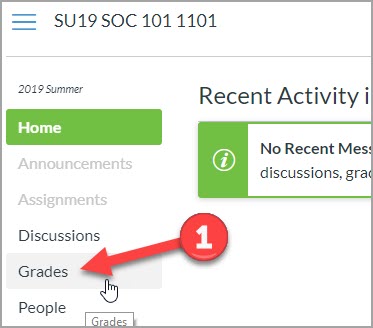
- Click on Grades
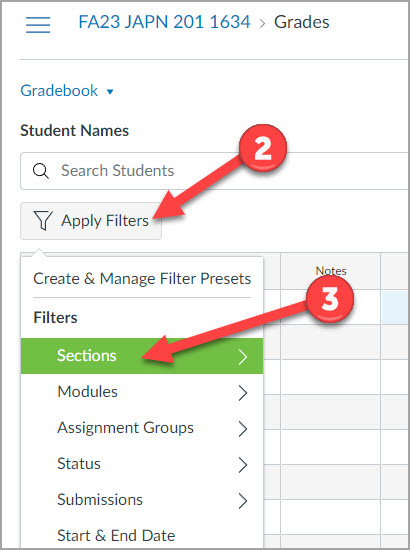
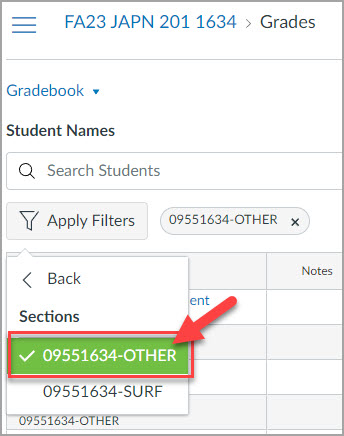
- Click the Apply Filters button
- Click Sections
- Select the section number that ends in -SURF
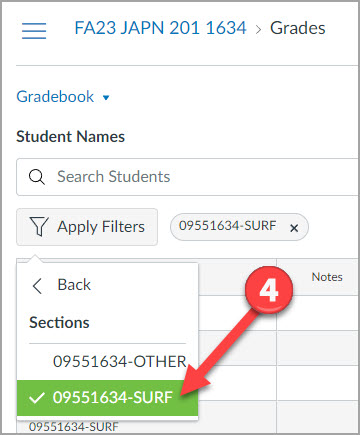
To display only users in the -OTHER roles
- Select the section number that ends in -OTHER to view only non-SURF enrollment types.
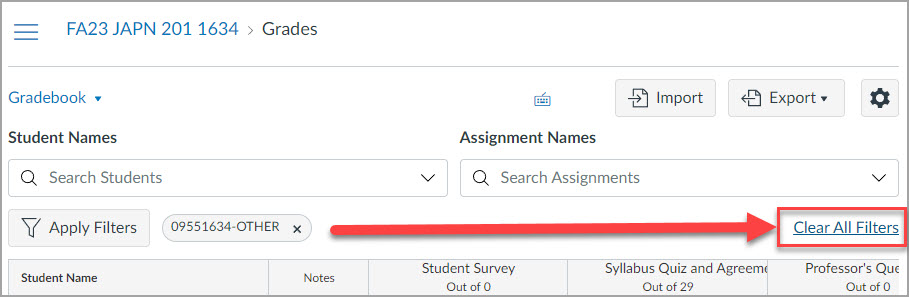
To display all users together in the Gradebook
- Select the Clear All Filters link on the right side of the Gradebook to view all enrollment types.
Custom Filters in Gradebook
It is possible to build a gradebook filter in Canvas that is just right for your grading needs. These custom gradebook filters can be used once or saved for future use.