Hyperlinks that include link text that identifies the purpose or destination of the link can provide important clues that help website visitors choose which links to follow. Using appropriate link text helps website visitors scan for relevant information, identify outside resources, and choose which links are the most relevant for their needs.
Guidelines for hyperlink text:
Identify the purpose or function of the hyperlink as part of the hyperlink name.
Be as descriptive as possible without being overly long – a screen reader user will have to listen to the whole link before moving to the next link on the list.
Integrate the link into your sentence – sighted users will see the link, and screen readers will hear the link.
Ask yourself when writing a link text, “Will the reader know where they are going just by the link text alone?”
Ambiguous link text can be problematic as it does not communicate the purpose or function of the link. Using link text on a web page such as “Click here” or providing the full hyperlink URL does not provide sufficient information as to the purpose or destination of the link.
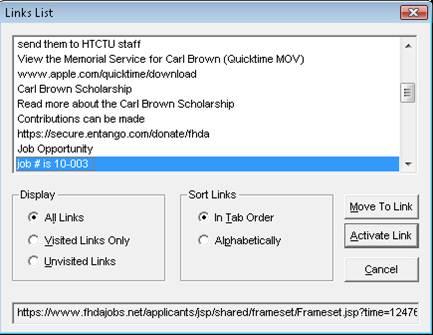
Some assistive technologies, such as screen readers for blind and visually-impaired individuals, have the capability to scan and present a list of all the hyperlinks on a web page thus allowing that person to quickly jump to the relevant link instead of being forced to listen to the entire page line-by-line.
This “Links List” functionality can be helpful for someone using such assistive technology, but only if the link text is descriptive. While a sighted person may be able to understand the purpose of the link text “Click here” or “Read more” based on its location and positioning relative to other content on the page, this information is not available for someone who is blind or visually impaired.
Creating link text that communicates the purpose and/or function of the hyperlink can provide clarity as to the role of that link for all web page visitors.
Images not only provide visual appeal to our pages, but they also convey important information. The old adage, that a picture tells a thousand words, can be very true! The problem occurs when we add an image that provides the content to our students, but fail to provide an adequate text alternative for students who are visually impaired. The alternative text – called alt text for short – feature allows you to provide a description of the image.
There are times when images not only provide information but also serve a function, such as a button or links to additional resources. In this case, the alt text should communicate the function.
There are scenarios where descriptive alt text is not required and the use of the image is intended as visual decoration only. In this case, alt text is not necessary as the image has no real content value. Many images, however, have a pedagogical purpose, and , therefore , require descriptions explaining the information the images conveys.
General rules for alt text
When thinking of an appropriate text description, the alt text should be:
Accurate: including spelling, grammar, and proper punctuation.
Concise: using the fewest words possible while providing a meaningful description for the image.
Equivalent: presenting the same content and/or function of the image.
Ask yourself when writing an alt text, “If you have to describe it over the phone, what would you have said?”
Common Mistakes
Stating “image of”, “graphic of”, or “picture of” in the alt text field. Assistive technologies will announce if the object is an image, so including this information is redundant and not necessary. If the image medium is an important aspect (such as a photograph or oil painting), then the medium should be included.
Adding the file extension, such as .jpg or .png, to the alt text description.
Writing effective alt text practice
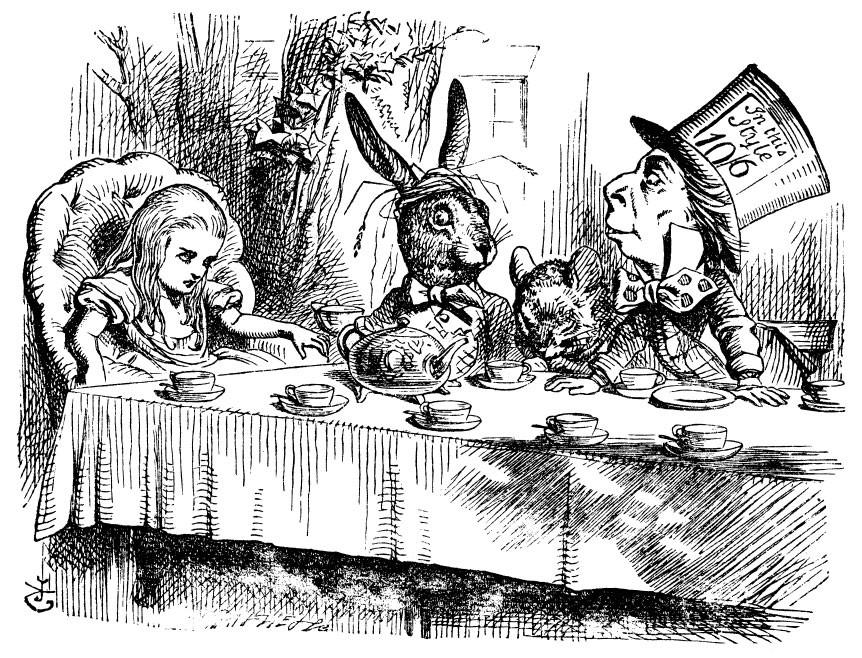
Based on the guidance above, take a moment to think of an alt text for the image below:
You may have written, “Alice at the Mad Tea Party with the Hare, Dormouse, and Mad Hatter”. Now, how would the alt text change if this was an art class focused on the illustration style?
The alt text will depend on the context and intention of the image.
A descriptive alt text may be, “John Tenniel’s cross-hatching illustration style is a linear drawing technique that uses lines to create shadows.”
Canvas is the learning management system (LMS) available for all MiraCosta classes. Canvas provides instructors with a platform to communicate with students, post course materials, and create online assignments.
Canvas accessibility best practices include:
Headings & Structure
Images
Links
Tables
Color
Extended Time for Canvas Quizzes
Headings & Structure
Headings
Headings can provide an organizational and navigational framework for a document’s content, communicating both the informational hierarchy and relationship between different sections. Headings also provide a simple mechanism for an individual using assistive technologies to “jump” from one heading to the next when navigating the document.
Highlight the brief word or phrase, or place your cursor on the line.
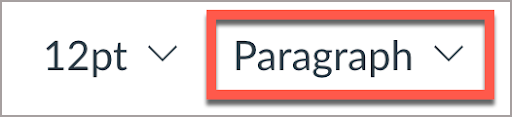
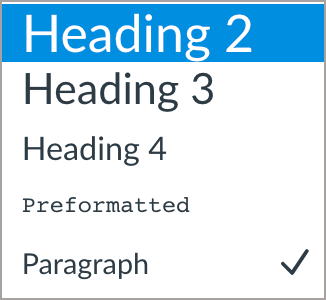
In the Rich Content Editor select the styles dropdown menu to reveal Headings 2-4.
Heading Guidelines
Headings should follow a logical structure that identifies content based on the organizational content and hierarchy of information in the document.
Canvas automatically tags the page title as Heading 1. Page content headings should start at Heading 2.
Avoid skipping heading levels.
Headings should be short and succinct.
For additional guidance on formatting, please review the information on Structure.
Lists
Lists provide a structured order to a group of connected or sequential content. A numbered or bulleted list may present the same information more effectively than simple data tables with fewer steps.
Highlight the grouped text.
In the rich content editor, select the appropriate list style (bullet or number list).
Formatting guidelines:
Remove any lists created manually, such as those using dashes, asterisk, or other symbol characters.
Avoid using indentation to provide a visual list in lieu of the list style button.
Numbered lists are used to present a group of items (words, phrases, sentences) that follow a sequence.
Bulleted lists are used for a group of items without a sequence.
Lists should contain at least two or more list items, unless being used to create an outline.
Nested lists are acceptable, such as a numbered list that contains a nested bulleted list.
Images
Images that support the content require a text description (also called “alt text”) that communicates the purpose and/or content of the image. This information is presented to the individual using assistive technologies, allowing them to hear the description of the image. Image descriptions should be short and communicate the main purpose of the image. Images that are decorative can be marked as such and are ignored by assistive technologies.
If a longer description of the image is necessary to fully explain its content, consider inserting a more detailed description of the image within the document text that precedes and/or follows the image.
Adding Alt Text
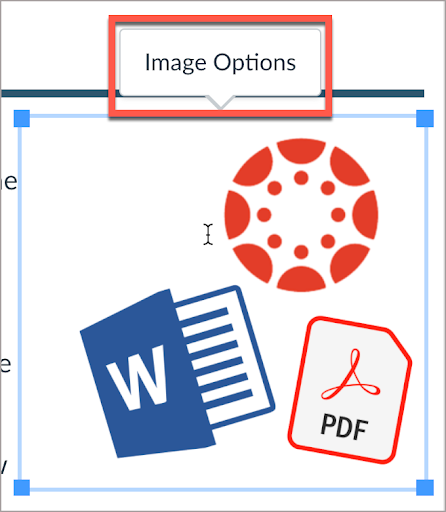
Select the image. The image should be outlined blue and have four blue squares at each edge.
When the image is selected, an Image Options will appear either above or below the image.
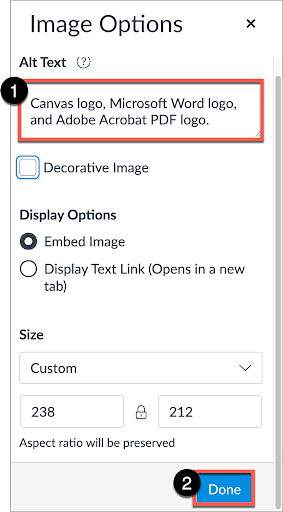
If the image has pedagogical value, write a brief description in the Alt Text box.
Select Done to save the information.
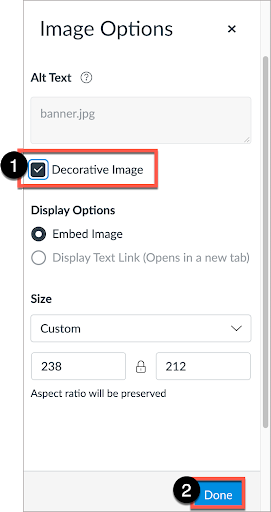
If the image is decorative, select the Decorative Image checkbox.
Image Guidelines
A text description should convey the purpose or content of the image in approximately 140 characters or less. Avoid repeating the same information as contained in the surrounding text.
If the image is complex, use a short alt text description for the image and then provide additional information in the surrounding text of the document.
Do not include the file format in the alt text (Example: .JPEG, .PNG).
Do not include phrases “A picture of” or “An image of” as part of the alt text.
For additional guidance on writing effective text descriptions (i.e., alt text), please review the information on Images.
Hyperlinks
Documents containing hyperlinks to websites or other online resources can be improved by using descriptive link text that is understood by the reader instead of the full URL. Using the full URL as the link text may not make sense to the reader, particularly if it is long.
Link to an External Resource
Highlight the text to be converted into a hyperlink.
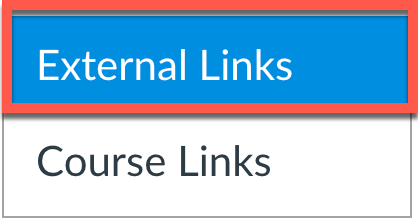
In the rich content editor > select Links > External Links.
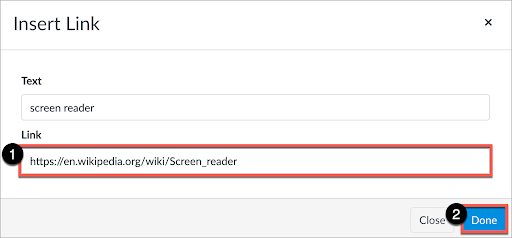
In the “Insert Link” window, add the URL to the Link field. Select Done.
Edit an Existing Link
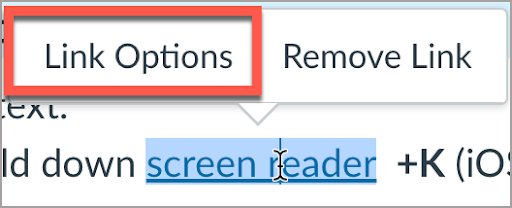
Place cursor on link. A submenu will appear. Select Link Options.
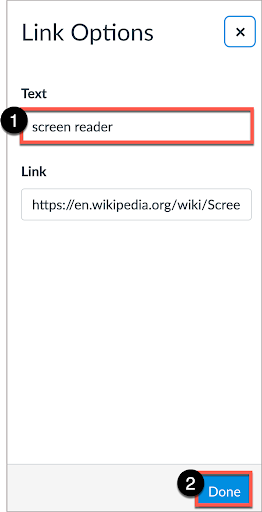
In the Text field, write descriptive text. Select Done.
Hyperlink Guidelines
Use link text that is descriptive and or informs the person as to the link’s destination.
For additional guidance on formatting and descriptive link text, please review the information on Hyperlinks.
Tables
Tables in Canvas should be used for data and not layout purposes. An accessible table includes the following:
At least one header (row and/or column).
Alt Text description summarizing the table.
The easiest method to ensure an accessible data table in Canvas is to use the Accessibility Checker. After you create the table in the Canvas Rich Content Editor, use the Accessibility Checker to add the appropriate table header information.
Color can be an effective method to communicate ideas and draw attention to information. Ensuring there is sufficient contrast as well as using color in combination with text formatting can support a diverse campus community, including individuals with visual disabilities.
Contrast
When choosing colors to present text information in documents, avoid pastel colors or the “light” version of a particular color. Such color options do not provide sufficient contrast against a white background. Contrast ratios should be the following:
4.5:1 for regular text
3:1 for 18 point font and larger, or 14 point font and bold
Contrast ratios may be evaluated using tools such as:
When using color to indicate a specific condition or state, include text formatting to provide a distinguishing characteristic. For example, if a list of vocabulary words were identified only in red text, this could present difficulties for an individual who has a type of color-blindness.
Use color and formatting to support accessibility, such as:
Red text with Bold formatting
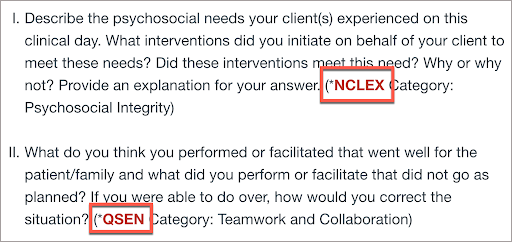
Using an asterisk, brackets, or other annotation symbols in addition to color
Canvas Text Color Guide
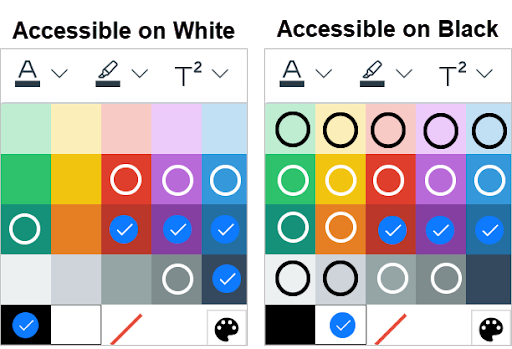
This infographic provides a guide of text colors accessible on Canvas’ white background and text colors accessible on black backgrounds as guidance. ✓ = accessible colors o = colors that are accessible only for large text (Header 2, or 18pt and larger)
Hex Code Option Now Available
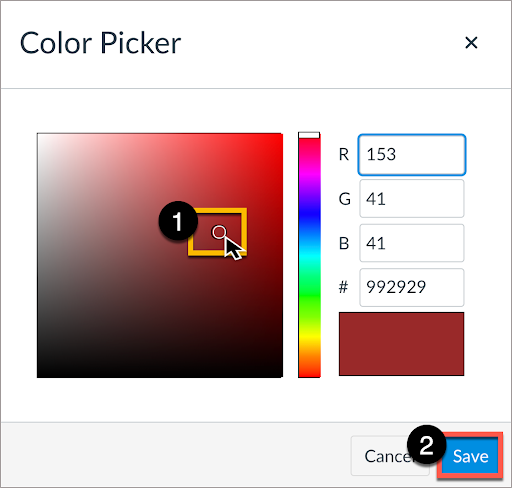
The new color palette allows for customized colors. Using the Hex code along with a color contrast tool can help you identify an appropriate color combination.
Select Text color.
Select Custom color.
The Color Picker dialogue box should appear with the option of entering either the decimal or hex code. Select Save.
Canvas Quiz and Extra Time
Some students may require additional time on a Canvas Quiz. Instructors can modify Canvas Quiz settings to allow for multiple attempts or to support students approved for an extended time. Please see the Canvas Instructor Guide: How to grant extra time or attempts in a quiz.
Captions are the display of text on-screen representing the dialogue and sound effects present in a video. Captions are synchronized with the video presentation and provide an accessible alternative for individuals who cannot hear the content. Captions include any spoken information as well as all relevant parts of the soundtrack, including background noises, sound effects, speaker identification, and any other audio cues that help the viewer understand the video.
Transcripts, unlike captions, are a text alternative to audio files, such as a podcast or pre-recorded radio show, and are not synchronized with the presentation. Transcripts should include speaker information or any other informational cues appropriate to understanding the recording. While transcripts may be provided for pre-recorded videos, they must be provided for audio-only content.
Guidance
Audio should be accompanied by accurate text transcripts. Audio should not auto-play.
Video should include at minimum accurate closed captions. Video should not auto-play.
Synchronous interaction tools (e.g. Zoom) should have an option for live captioning if required.
While auto-generated captions have made significant progress, they are still not as accurate as those produced by a professional captioner and may include critical errors that impact the information or context of what is communicated. Such errors may include incorrect text, a lack of correct punctuation and grammar, and missing speaker identification. Auto-generated captions may be used as a starting point from which to edit and create a more accurate captioned video.
Audio Descriptions
Audio descriptions provide a verbal depiction of the key visual elements in a video presentation. For individuals who are blind, visually impaired, or unable to view the video directly, audio descriptions communicate the important information relevant to understanding the video content. For example, a video may display a speaker’s name and title or specific instructions to follow. If this information is not included as part of the spoken dialogue, then it needs to be communicated as part of a separate audio description.
The Description Key from the Described and Captioned Media Program provides guidance for how to produce audio descriptions, including what to describe and how to describe on-screen information:
Please contact Aaron Holmes, Access Specialist at [email protected].
For new videos
One solution is to write your script so that any relevant on-screen information or cues are described in the spoken dialogue of the video, thus reducing the need for a separate audio description.
To all faculty teaching this summer – please take advantage of and share these important resources and opportunities for you and your students!
Support for You
Instructional Design help – To request online teaching and course design support from our instructional designer, please fill out our request form. We’ll get you connected! (This is only available through June.)
Tech Support – Canvas options include 24×7 phone and chat support. Just click the Tech Support button at lower left in Canvas! Zoom tech support for faculty is available through the MiraCosta employee help desk.
The MiraCosta Online Class Quality Guidelineswere significantly updated this spring and approved by the Academic Senate in May. Please review them to learn more about MiraCosta requirements and recommended practices for online instructors.
MiraCosta technologies supporting online teaching and learning – please see the last section of this email for an overview, with links to learn more.
Support for Your Students
Student Orientation to Online Learning – In collaboration with the library, I’ll be offering eight of these workshops at the start of the summer semester– see all dates and times on the TASC site and in Canvas announcements. These workshops help to familiarize students with the resources MiraCosta provides online to support them, as well as to adopt habits and attitudes of successful online students. Encourage your students to attend and, if you like, find out which of your students participated in order to incentivize their attendance.
Online Student Support Access Points – the Student Support Hubin Canvas, accessed via the Student Support button on the left in Canvas gives quick access to online support from the library, STEM & MLC, online tutoring, writing center, counseling, career center, open computer lab staff, student help desk, health services, and more! The Help Hut on the MiraCosta website is also a quick way for students to connect with all kinds of support services including A&R and Financial Aid.
Tech Support – Also at lower left in Canvas is a button for students to quickly access Tech Support options, including 24×7 phone and chat support from Canvas, and our local MiraCosta student help desk.
Technology Needs? – Be sure to share the CARE form for students to fill out if they need a laptop and/or hotspot to succeed this summer.
MiraCosta’s Online Education Tools
Click the link immediately after each bullet for a detailed MiraCosta-specific overview of each item below. This is not intended as a comprehensive review of all technologies for online teaching supported by the college, but rather a quick look at the essentials. Please don’t hesitate to contact me if you have questions about these or other resources.
Canvas – of course is the #1 tool for most faculty.
Zoom – Make sure you are using MiraCosta’s professional-level Zoom account to get access to the full set of Zoom features.
Canvas Studio – This great tool enables faculty and students to create videos while inside Canvas. Faculty can create interactive discussion or quiz activities based on video.
Pronto is an incredible mobile-friendly and Canvas-integrated messaging platform that’s ready to use in every course.
Pope Tech helps faculty detect and correct accessibility issues within Canvas. See also Creating Accessible Course Content for tips on ensuring all the content you add to Canvas is fully accessible.
Ally automatically converts content you share through Canvas into multiple formats for students, allowing for listening rather than reading and better access to content on mobile devices.
PlayPosit – This video interaction tool offers more complexity and options than Studio. Studio is a great place to start, but if you’re looking for more question types to add to your videos, PlayPosit is a great option.
Turnitin – Many faculty use Turnitin to help students learn to properly cite sources and avoid plagiarism, as well as to assist with grading and peer review processes for written work.