
MiraCosta Online Ed Pre-Fall Email #2

Hi! This is the second in a series of emails about all things online leading up to MiraCosta’s fall 2020 semester. Check out email #1 if you missed it.

Tuesday news: 

  • Quick reminders about online teaching tools available at MiraCosta
  • Broken Links: Now, more than ever
  • CE Faculty can call on a superhero for support

MiraCosta’s Online Teaching Tools

Click the link immediately after each bullet for a detailed MiraCosta-specific overview of each item below. This is not intended as a comprehensive review of all technologies for online teaching supported by the college, but rather a quick look at the essentials. Please don’t hesitate to contact me if you have questions about these or other resources.

  • Canvas – of course is the #1 tool for most faculty. We’ll have a Canvas Basics workshop this Friday as well as four hours of open online Canvas support by expert staff and faculty (details coming tomorrow). Even for experienced Canvas users, our Canvas Start of the Semester Instructor Checklist is a super useful set of reminders as you set up your fall classes. (Unfortunately, as detailed below, some of the links on our Canvas support pages to Canvas guides may be broken. Check out the new home of Canvas’s official Instructor Guides – also an enormously helpful resource.)
  • Zoom (specifically, ConferZoom) – Suddenly, we’re all Zoom users, and many of our classes are now incorporating Zoom. Make sure you are using the professional-level Zoom account available through CCC’s ConferZoom! We’ll have a Zoom Basics flex workshop on Monday (details coming tomorrow).
  • Canvas Studio – This great tool enables faculty and students to create videos while inside Canvas. Faculty can create interactive discussion or quiz activities based on video.
  • PlayPosit – MiraCosta has been piloting this video interaction tool for several years; it’s now available to all faculty. Studio is a great place to start, but if you’re looking for more question types to add to your videos than Studio offers, PlayPosit is a good option. We’ll have a PlayPosit flex workshop this Friday (details coming tomorrow).
  • Turnitin – Many faculty use Turnitin to help students learn to properly cite sources and avoid plagiarism, as well as to assist with grading and peer review processes for written work.
  • Academic Integrity and Canvas Exams and Proctorio – Proctorio remains available at MiraCosta through December 2020, funded by the CCC system. If you are conducting high-stakes objective assessment online, check out these resource articles.
  • Creating Accessible Course Content – by regulation (and in terms of good practice) all online course materials should be compliant with accessibility laws. Our guide has tips for how to do this!
  • Productivity Software, Hardware, and other resources for working from home – this AIS website includes a number of links to helpful resources for being fully equipped when teaching from your home.

I Don’t Like That You’re Broken …

Broken links are a fact of life on the web, and developers of online courses need to be vigilant. Canvas has a helpful tool for checking all links in your course at one fell swoop … the Canvas Link Validator. This may be especially important for you to consider due to two recent developments:

  1. In case you hadn’t noticed, MiraCosta’s shiny new website debuted this summer. Links to MiraCosta website resources you may have included in a Canvas course likely aren’t working now! The A-Z index on the new site may be a helpful way of re-finding the correct links. There will be a Search function on the new site, but it depends on giving Google the time it needs to index the full site. If you get frustrated trying to find the right links, Kristen Huyck, MiraCosta’s stellar public information officer, has told me she would be happy to help any faculty members – please reach out to her: [email protected] .
  2. Canvas last week updated the websites where their awesome instructor and student guides live. They’ve promised that links to the old guides will redirect to the new guides, but so far it doesn’t seem to be happening consistently. You might give this a few more days, but if you embed student Canvas guides in your courses to help students out (a great practice!) you’ll want to double-check this at some point before the semester starts.

Instructional Design Support for CE Faculty
If you teach a Career Education class, we have a grant-funded Instructional Design expert available to support you in your course design efforts. Her name is Liesl Madrona and the faculty that worked with her last year found her extremely helpful. If you’d like to hear more about this opportunity, please reply to me.

Until tomorrow …

Jim Julius, Ed.D.
Faculty Director, Online Education
MiraCosta Online Ed Pre-Fall Email #1

As our first-ever mostly-online fall semester approaches, I hope everyone is doing well! I have a lot of info and resources to share, and will be sending an email each day this week with a few updates.

Monday news:

  • Combining Canvas courses for those teaching multiple sections of a course
  • Professional Learning opportunity: @ONE’s Humanizing Challenge is Aug 11-13
  • Summer term classes in Canvas become read-only on Aug. 14

It’s Back! Merging Canvas Course Sections!

If you teach multiple sections of the same course, you may know that MiraCosta has not been allowing combination of multiple course sections into one Canvas shell due to FERPA concerns. Faculty, admin, and staff met several times over the last year to not only figure out how to address the FERPA issues, but also to put into place a new SURF dashboard that enables faculty to make this occur without any additional gatekeeping or case-by-case handling of this technically.

Given our mostly-online nature at present, this should enable faculty who are teaching multiple sections of one course to (if they desire) not have to put as much time into managing class content and activities (duplicating/updating the same things across multiple Canvas courses) and rather to focus more time on supporting individual students and enhancing the quality of their course. For faculty who do request a merged course in Canvas, there are some important guidelines you will need to follow to ensure that FERPA compliance is maintained. See our guide to learn more about merged course sections in Canvas, and if you’d like to request this, see the guide to the SURF dashboard for merging course sections.

Looking for Online Teaching Inspiration? @ONE’s Humanizing Challenge is Aug. 11-13

@ONE’s Humanizing Challenge “is designed to equip faculty with knowledge of culturally responsive pedagogy and a toolkit of online teaching practices that will support students who are experiencing trauma as a result of racial injustice, stereotyping, and other forms of marginalization.” If you’re looking for fresh ideas on truly connecting with your students online this fall, I encourage you to check out the Humanizing Challenge home page, and decide which sessions will be most useful to you. Sessions start tomorrow (Aug 11) and continue through Aug. 13.

We will be announcing local online teaching workshops for Flex week in the next couple days, but if you’re looking for something ASAP, please take advantage of this CCC professional learning opportunity.

Summer Canvas Classes Become Read-Only After Aug. 14

After Aug. 14, summer Canvas classes go into read-only mode for faculty and students. If you taught this summer and wish to restrict access to any of your course materials for your current students after that date, please review our Canvas end-of-term guide and take action prior to the 14th.

Jim Julius, Ed.D.
Faculty Director, Online Education

Student Support Guide Module from Canvas Commons

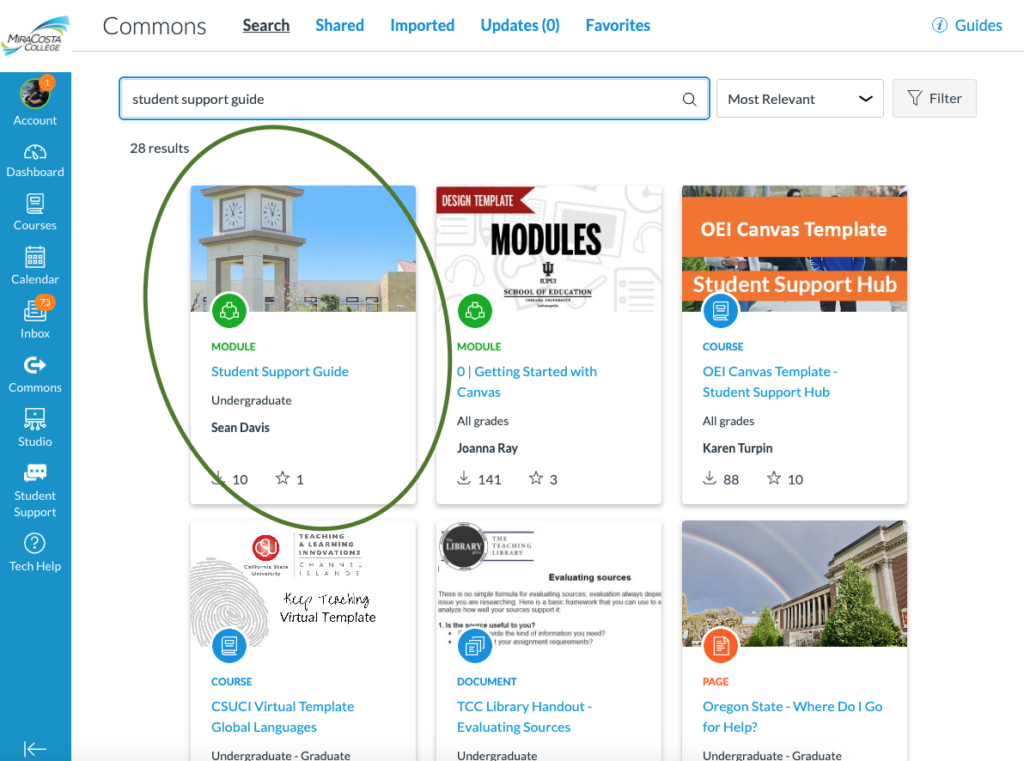
The MiraCosta College Student Support Guide Module is available from the Canvas Commons.

This module has relevant student resources and links that would be appropriate to go within the first week course content within a Canvas course.

Go to the Commons in Canvas and search “Student Support Guide” and you will be able to access it. 

Directions


Student Support Guide

Embedding Google Docs in Canvas

If you are embedding a Google doc for content purposes (ie you aren’t having students edit the document), I recommend the trick of replacing the end of the Google doc URL from the last forward slash to the end with preview?pli=1

Here’s an example.

Here’s the standard URL of a Google doc set up with permissions for others to be able to view it:

https://docs.google.com/document/d/11r3xiCe5Q7FNtb6x9opJAjL8JcaUwmIuw2_CJtPIySk/edit?usp=sharing


I change the final part after the last slash

from:  edit?usp=sharing
to:      preview?pli=1

So now the URL is:

https://docs.google.com/document/d/11r3xiCe5Q7FNtb6x9opJAjL8JcaUwmIuw2_CJtPIySk/preview?pli=1


When editing in the Canvas rich content editor where you want to embed the Google doc, click the button at upper right of the editing window that says HTML Editor.

Then you need to add code that looks like this:

You can just copy this code for future use, and substitute the URL in the code with the URL of your Google doc.

You can also adjust the width and height to your preference, but these seem to work well.

Personal Pronouns in Canvas

Setting your Personal Pronouns in Canvas can help classmates, faculty, and people in the MiraCosta community learn to address each other the way each person would like to be addressed. That information will be available to instructors, students, and anyone who has access to Canvas courses, to enable inclusive and respectful conversation. 

Available Pronoun Options at MiraCosta College

  • He/Him/His
  • They/Them/Their
  • She/Her/Hers
  • (F)ae/(F)aer/(F)aer
  • Use my name
  • Xe/Xim
  • Ze (or Zie) / Zir (or Hir)
  • Per/per/pers
  • Ve/ver/vis
  • E/Ey/ Em/Eir

Submit a Request for Another Option

If you use pronouns that are not currently listed as options, please fill out the Pronoun Addition form and return it according to the instructions on the form.

Faculty Directions

Personal pronouns display after your name in various areas in Canvas as an instructor, including:

  • Assignment Creation Menu
  • Assignment Peer Review Page
  • Comment Fields
  • Course Sections List
  • Discussions
  • Inbox
  • People Page (Course and Groups)
  • SpeedGrader
  • Student Context Card
  • User Navigation Menu
  • User Profile Page
  • User Settings Page

Notes:

  • LTI tools, such as New Quizzes and Analytics, do not currently support displaying pronouns.

Student Directions

Personal pronouns display after your name in various areas in Canvas as a student, including:

  • Comment Fields
  • Discussions
  • Inbox
  • People Page (Course and Groups)
  • User Navigation Menu
  • User Profile Page
  • User Settings Page

Notes:

  • LTI tools, such as New Quizzes and Analytics, do not currently support displaying pronouns.
1 18 19 20 21 22 30