

Complex Data & Graphs Concept

Complex Images

Complex images contain substantial information – more than can be conveyed in a short phrase or sentence. These are typically:

  • graphs and charts, including flow charts and organizational charts;
  • diagrams and illustrations where the page text relies on the user being able to understand the image;
  • maps showing locations or other information such as weather systems.

In these cases, a two-part text alternative is required. The first part is the short description to identify the image and, where appropriate, indicate the location of the long description. The second part is the long description – a textual representation of the essential information conveyed by the image. The following examples show different approaches that can be used to provide such short and long descriptions.

Accompanying text (Long Description) 

There are situations where the composition of an image is important and needs to be provided in the long description. For example, the sequence of colors used and the relative heights of the columns in a bar chart may be relevant information about the structure of the chart, in addition to the actual values and trends that it depicts.

Remember that complex images can be difficult to understand by many people – in particular people with learning disabilities and people with low vision. Long descriptions benefit many people, and it is good practice to make them available to everyone, for example, as part of the main content. It may also be possible to reduce unnecessary complexity in your images and make them easier to understand for everyone.

It is also good practice to refer to and summarize more complex images from the accompanying text. For example, a reference such as “The following graph shows that visitors were lost in the first quarter, but the numbers recovered in the second quarter” helps to point out the relevant information that the image is intended to present.

Web Accessibility Initiative. (2019, July 27). Complex Images. W3. https://www.w3.org/WAI/tutorials/images/complex/

Example: Description containing structured information
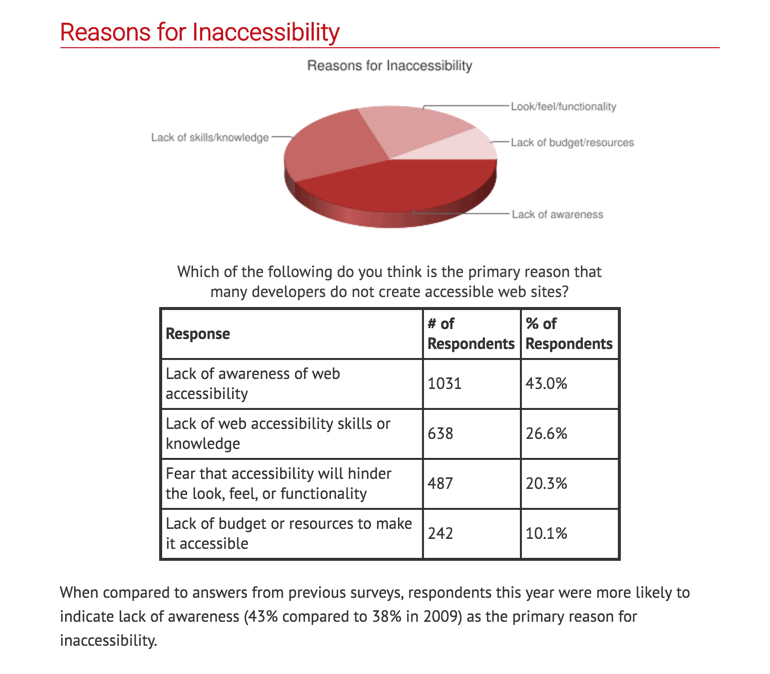
Long description of the pie graph above

Overview

The pie graph shows the various reasons for inaccessibility including in the order of popularity:

  1. Lack of awareness 
  2. Lack of skills/knowledge 
  3. Look/feel/functionality 
  4. Lack of budget/resources

Which of the following do you think is the primary reason that many developers do not create accessible websites?

Values

Numerical values presented on the image:

Response# of Respondents% of Respondents 
Lack of awareness of web accessibility 103143.0%
Lack of web accessibility skills or knowledge63826.6%
Fear that accessibility will hinder the look, feel, or functionality 48720.3%
Lack of budget or resources to make it accessible24210.1%
Response Number and Percentage of Respondents

Presentation

Write text from the image directly on the Canvas page and add pie graphs and charts. See Accessible Version of Reasons for Inaccessibility to review example on a Canvas page.

Free Online Canvas conference, Friday 10/25

Can innovate - Friday October 25, 2019

The online Can-Innovate Conference is coming soon – Friday, October 25, 9 am – 5 pm. This event features a variety of sessions about online teaching, course design, and the use of Canvas, by and for California Community College faculty and staff. It’s completely free; you do need to register for the sessions that interest you in advance to be able to attend online from anywhere.

MiraCosta’s C3 Teaching and Learning Center will also be hosting viewing throughout the day with refreshments provided, so feel free to check out the program and drop in anytime – no registration required. The C3TLC is on the second floor of the Oceanside Library, rooms 1252 and 1253B. We also have Canvas giveaways – bags, pens, notepads, and stickers – for those who stop by the C3TLC during the event.

Participation either way is, of course, Flex-eligible. I hope you are able to identify at least one session of interest and attend! [Of special note perhaps – Karen Turpin and I are co-presenting with CVC-OEI during the closing 4 pm session, showcasing MiraCosta’s Student Support Hub that we’ve added to Canvas this year.]

Jim Julius, Ed.D.
Faculty Director, Online Education

Arc Demo and Conversation for MiraCosta Faculty (Thursday, April 23 at 6pm)

Hello Faculty Colleagues,

As we wrap up the semester and our pilot period for our new video management system, Arc, we want to share an opportunity to learn more about this tool. 

The folks at Arc have agreed to host a demo/conversation designed for our faculty at MiraCosta. The session will include:

1. A quick overview of the product and Arc basics.
2. One to two features a faculty member can implement now at the end of the semester and/or soon in preparation for Summer and Fall courses.
3. An update on status of quizzes in ARC. Where are they now? What new features were integrated this semester since we started the pilot in January? 

Join us on Thursday, April 25 at 6 pm. ( Click here to enter the meeting )

One Word Agenda – Brown Bag Series Wednesdays from 1:00pm to 1:30pm in the Pedagogical Lounge OC1252

So I was not alone last week for Digital Learning Day – thank you for that! I was fortunate to have some great conversations with colleagues and was reminded that we just don’t do that enough. My proposal – let’s do more of that. Often we are guided by detailed agendas and lesson plans, but some of the best professional development can come from a conversation.

If you are available, please join me for the One Word Agenda Brown Bag Series in the Pedagogical Lounge (Did you know we have a Pedagogical Lounge? And a Teaching and Learning Center?). This is not a workshop. This is not for Flex. You can bring your lunch. We can discuss the topic for the day. The best part is we don’t have to do any of those things if we don’t want to. However, I still hope to see you there! ?

-Sean Davis

ONE WORD AGENDA - BROWN BAG SERIES WEDNESDAYS FROM 1:00PM TO 1:30PM IN THE PEDAGOGICAL LOUNGE OC1252. March 6, 13, 27 April 3, 10, 2019
1 2 3