

YouTube Migration Tool in Canvas
For a distraction-free, seamless learning experience, you can migrate embedded YouTube videos in Canvas into Studio, whether they were added with embed code or through the YouTube LTI.
In September 2025, Canvas Studio implemented the YouTube Player for Education. Starting September 22, 2025 any existing or new YouTube videos added to Canvas may display ads. To avoid this you can migrate the videos manually to Canvas Studio or use the YouTube Migration tool in Canvas. The YouTube Migration tool helps teachers identify videos in their course that may display ads.
What happens when you migrate YouTube videos into Studio?
- No ads or pop-ups will appear during playback.
- Overlays (like recommendations, channel info, or “watch later” buttons) are removed.
- You gain Studio tools, including analytics to see how students watch your videos.
- Captions are preserved (only for videos with ‘public’ visibility).
Migration options
- Using the YouTube Migration Tool → videos go directly into Course Collections.
- Migrating manually → videos are saved to your Studio library.
YouTube Migration Tool
Watch this video to learn how to use the Migration Tool in Canvas to migrate any YouTube videos in your course.
Scan Embedded YouTube Videos
You can use the migration tool via the Course Navigation Menu. It is only visible to teachers and appears at the bottom of the course navigation menu on the left.
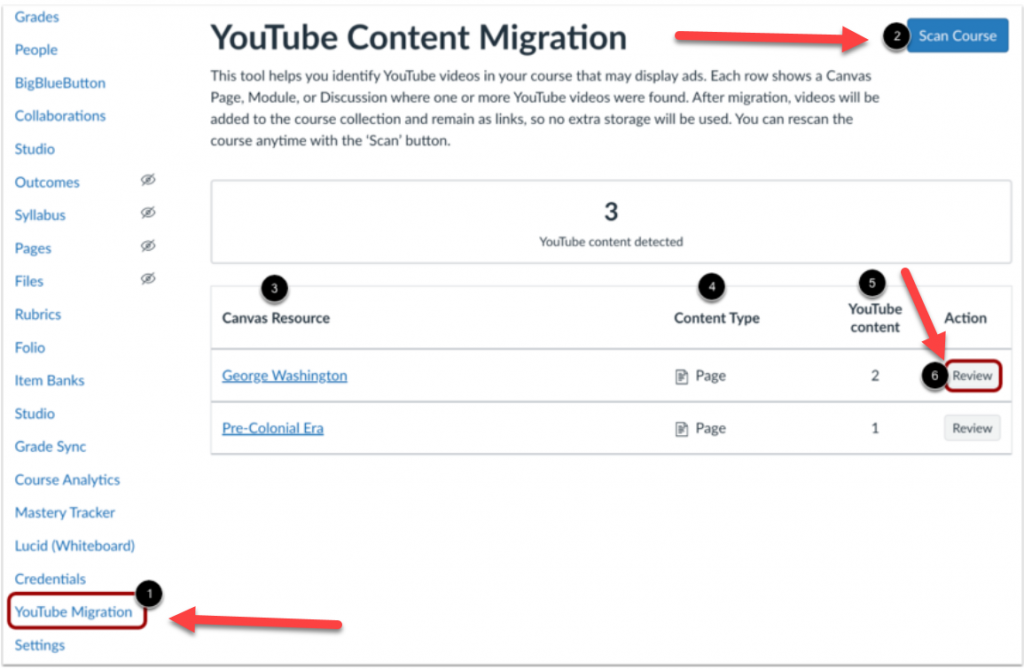
In Course Navigation, click the YouTube Migration link [1]. To filter embedded YouTube videos, click the Scan Course button [2].
A list displays the Canvas resources where the YouTube videos are embedded [3], the content type [4], and the number of YouTube content detected for each Canvas resource [5].
To migrate the videos into Studio content, click the Review button [6].
To learn more about the YouTube video migration tool visit the YouTube Player for Education FAQs page. In addition the Canvas resource on how to migrate embedded YouTube videos page provides step-by-step instructions and additional resources.
Important!
- Only embedded videos and videos added through the YouTube LTI can be migrated through the Migration tool. YouTube links (which are external) cannot be migrated.
- The migrated videos will only be visible in the Studio ‘Course Collection’; these will not be visible/available through the Studio user library. However, YouTube videos directly added to Studio will be available in the user library.
- Migrated YouTube videos will NOT import in a different Canvas account when shared through Canvas Commons. These will, however, import within the MiraCosta instance of Canvas.
- Captions will NOT automatically appear for migrated videos set to ‘unlisted’ visibility. Captions will need to be created or uploaded for such ‘unlisted’ YouTube videos. Caption will automatically appear for any migrated YouTube video set to ‘public’ visibility.
For more information or if you have questions, please contact Nadia Khan: [email protected]